> For the complete documentation index, see [llms.txt](https://docs.charted.com/ap-automation/llms.txt). Markdown versions of documentation pages are available by appending `.md` to page URLs; this page is available as [Markdown](https://docs.charted.com/ap-automation/release-notes/charted-2024.2.md).
# Charted 2024.2
{% hint style="success" %}
Charted 2024.2.1+ has been certified by Charted to be compatible with NetSuite 2024.2 and is backwards compatible with NetSuite 2024.1.
{% endhint %}
Charted 2024.2.33 (2025-1-30)
**New Features:**
* **\[Invoice AI]** The Charted navigational menu now includes links to access the "Not Submitted" and "Pending Approval" pages directly \[AP-444]
* **\[Expense Accrual Automation]** When creating an expense accrual journal entry, a csv file is now attached for supporting documentation \[AP-353]
**Changes:**
* **\[Expense Accrual Automation]** Certain General Leger (GL) accounts can now be excluded from the Accruals process \[AP-353]
* **\[Expense Accrual Automation]** A custom date field can now be used for determining bills pending approval that should be accrued. \[AP-353]
* \[**Payments Automation]** From Business Entity is now a required field when sending an invite to a payee \[IN-441]
**Bug Fixes:**
* **\[Advanced Check Printing]** Fixed decimal precision error on aggregating check total number on Print Checks page \[IN-440]
* \[**Payments Automation]** Fixed issue creating a funding source when no payment methods are enabled \[IN-434]
Charted 2024.2.32 (2025-1-25)
**New Features:**
* None
**Changes:**
* Miscellaneous system improvements and updates
**Bug Fixes:**
* None
Charted 2024.2.31 (2025-1-16)
**New Features:**
* **\[Expense Accrual Automation]** The accruals worksheet now contains a filter for amount to limit which lines returned and recorded within your expense accrual entry. \[AP-350]
* **\[Expense Accrual Automation]** A copy of the accruals worksheet is now attached to the journal entry for audit purposes \[AP-353]
* **\[Advanced Check Printing]** Total amount and number of checks calculated and displayed for all checks currently selected \[IN-397]
**Changes:**
* **\[Expense Accrual Automation]** The expense accrual journal entry accounts payable line now has a predefined memo included \[AP-276]
* **\[Approval Workflow Automation]** Removed 'Disable Redirect on Creation' setting \[IN-228]
* **\[Payment Automation]** Charted Payee Status and Preferred Payment Method will be updated on the Netsuite Vendor record for all onboarded payees \[
**Bug Fixes:**
* **\[Expense Accrual Automation]** The accruals worksheet can now be sorted by entry amount \[AP-318]
* **\[Expense Accrual Automation]** Only features enabled within an account will show up on the automate home page for administrators \[AP-397]
Charted 2024.2.30 (2025-1-6)
**New Features:**
* None
**Changes:**
* **\[Platform]** Additional Security enhancements \[PSS-124]
**Bug Fixes:**
* None
Charted 2024.2.29 (2025-1-2)
**New Features:**
* \[**Payments Automation]** Payees can now be reactivated after being deactivated in Charted \[IN-393]
* Reactivated payee payments will move to 'Ready for Release'.
* The status will be reflected on the vendor record in Custom > Charted Payee Status.
* \[**Payments Automation]** Updated dropdowns to be searchable when linking a funding source to a bank account \[IN-422]
* **\[Payments Automation]** Added CSV Export button to Ready for Release and Not Ready For Release tables \[IN-418]
* \[**Payments Automation]** Added waive account verification option for customers that are only using an account for checks only \[IN-382]
* \[**Payments Automation]** Added filters on the Funding Sources Table \[IN-407]
**Changes:**
* **\[Dashboard]** To Submit and To Approve Queries within the Dashboard only include credit memos if approvals is enabled for that record type \[AP-335]
* **\[Expense Accruals]** A transaction line field has been added to track relationship to Purchase Order transactions on Expense Accrual Journal Entries. \[AP-351]
* **\[Platform]** Charted home page includes additional links for Managing Bills, Expense Accruals, and the SuiteQL Playground \[AP-259]
Charted 2024.2.28 (2024-12-18)
**New Features:**
* None
**Changes:**
* **\[Payment Automation]** Removed type ahead filtering (combo box) functionality from dropdowns \[IN-420]
**Bug Fixes:**
* None
Charted 2024.2.27 (2024-12-17)
**New Features:**
* None
**Changes:**
* **\[Platform]** Additional Security enhancements \[AP-355]
**Bug Fixes:**
* None
Charted 2024.2.26 (2024-12-16)
**New Features:**
* None
**Changes:**
* None
**Bug Fixes:**
* **\[Invoice AI]** Resolved issue causing *TypeError: Cannot read property 'custom\_fields' of null*. \[IN-415]
Charted 2024.2.25 (2024-12-16)
**New Features:**
* None
**Changes:**
* **\[Payments]** The number of records filtered will be displayed at the bottom of the table when using the search bar within Charted (example: 1-25 of 40 Filtered Records) \[IN-402]
**Bug Fixes:**
* \[**Payments]** Resolved issue preventing invites from being sent by non-Admin roles. \[IN-411]
Charted 2024.2.24 (2024-12-12)
**New Features:**
* **\[Payment Automation]** Search for existing funding sources and business entities in the dropdown component when adding a funding source or linking a bank account. \[IN-386]
**Changes:**
* **\[Advanced Document Management]** PDF attachments can now be viewed in split screen mode while entering a bill within Charted. \[AP-94]
* **\[Payment Automation]** Added more in-app guidance for verification timeline when adding a new funding source. \[IN-345]
* **\[Payment Automation]** Improved error handling for outsource check printing. \[IN-395]
* **\[Payment Automation]** Hiding 'Additional CC Emails' and 'Charted Payee Onboarding TOS' on Netsuite Vendor Record, as these fields are not informative. \[IN-371]
* **\[Bills Inbox]** Removed the ability to sort on the 'Remove' column. \[In-329]
**Bug Fixes:**
* **\[Expense Accrual Automation]** Previous Month totals now only show the total for a unique line, not the entire PO. \[AP-321]
Charted 2024.2.23 (2024-12-2)
**New Products:**
* **\[Invoice AI]** Released [Invoice AI](/ap-automation/charted-features/invoice-ai.md) to SuiteApp customers. Invoice AI scales invoice processing with high-accuracy AI that adapts to your vendor formats without manual template setup.
Charted 2024.2.22 (2024-12-2)
**New Features:**
* **\[Expense Accrual Automation]** The accruals worksheet is now supports customizing GL details for recording expense accruals. \[AP-258]
* **\[Expense Accrual Automation]** The transaction table on the vendor detail view now supports navigation to the transaction by clicking on the transaction name. \[AP-290]
* **\[Payment Automation]** Added ability to deactivate a Payee. Deactivated Payees will not be reactivated and will not receive payments going forward. \[IN-222, IN-223, IN-224, IN-379]
* **\[Payment Automation]** The vendor record in Netsuite will now reflect payee status and preferred payment method for payees going forward in the 'Custom' tab. \[IN-370]
* **\[Payment Automation]** When onboarding a new business entity there is an 'Onboarding Help' button that references our documentation \[IN-347]
**Changes:**
* **\[Approval Automation]** Changes to Bank Detail records will no longer cause a vendor to need re-approval if approval resubmission is not enabled. \[AP-316]
* **\[Expense Accrual Automation]** Fields added for expense accrual automation will only be visible on forms if the feature is enabled. \[AP-320]
* **\[Expense Accrual Automation]** Entry amount calculations have been updated to take into consideration amount already recorded for the current period. \[AP-272, AP-275]
* **\[Payment Automation]** Inactivate payees will be filtered out by default, however, you can adjust the filter to view them using the new 'active' column. \[IN-369]
**Bug Fixes:**
* **\[Platform]** Addressed issue with scroll bar appearing in the middle of the page. \[AP-331]
* **\[Expense Accrual Automation]** Transaction table now supports sorting by date or Posting period. \[AP-299]
* \[**Payment Automation]** Fixed issue in Advanced Vendor Onboarding impacting vendors that would like to accept payment via check. \[IN-368]
* \[**Payment Automation]** Updated error message for when check images are uploaded in the wrong file format. \[IN-368]
* **\[Payment Automation]** Fixed issue impacting some payments from being hidden from the 'Not Ready For Release' queue. \[IN-390, In-389]
Charted 2024.2.21 (2024-11-26)
**New Features:**
* None
**Changes:**
* None
**Bug Fixes:**
* **\[Charted**] Resolved issue in processing specific events(IN-390)
Charted 2024.2.20 (2024-11-21)
**New Features:**
* None
**Changes:**
* **\[Payments Automation]** Include Not Ready For Release payments for payees without preferred payment methods (IN-389)
**Bug Fixes:**
* None
Charted 2024.2.19 (2024-11-13)
**New Features:**
* None
**Changes:**
* Redeployment of changes in 2024.2.18 caused by an unexpected deployment error.
**Bug Fixes:**
* None
Charted 2024.2.18 (2024-11-13)
**New Features:**
* **\[Payments Automation]** Added ability to create Virtual Funding Source type that links to an existing ACH and Check Funding Source for a single GL account \[IN-331, IN-359, IN-360, IN-365]
* **\[Payments Automation]** Payments Automation will append ACH network ID to the memo of the transaction and bill payment memo \[IN-352, IN-353]
* **\[Expense Accrual Automation]** Worksheet now displays the amount that is recorded in the current period. \[AP-271]
**Changes:**
* **\[Payments Automation]** Added filter on Transaction Status on Payments History Table \[IN-344]
* **\[Payments Automation]** Added message for changing check logo in Pay via Check settings \[IN-177, IN-374]
* **\[Payments Automation]** Added 'Withdrawal Date' and 'Bill Payment Date' in Payment History Detail View \[IN-297, IN-328]
* **\[Dashboard]** The AP inbox and To approve search will now display the name of the owner/approver respectively when auto-generated numbers is enabled for employee records. \[AP-279]
* **\[Expense Accrual Automation]** The All Subsidiary filter option has been removed from the worksheet. \[AP-270]
* **\[Expense Accrual Automation]** All expense transaction pending approval now display in the accruals worksheet, regardless of accrual type. \[AP-302]
**Bug Fixes:**
* **\[Approval Automation]** Resolved time out error in processing asynchronous approval actions \[AP-317]
* **\[Check Printing]** Limited the Check Printing search for only accounts that have check formats to improve search performance \[IN-351]
* **\[Expense Accrual Automation]** Resolved rounding issue for Expense history graph. \[AP-298]
Charted 2024.2.17 (2024-11-13)
**Bug Fixes:**
* **\[Payments Automation]** Moved checks that previously failed to ready for release \[IN-367]
Charted 2024.2.16 (2024-11-05)
**New Features:**
* None
**Changes:**
* None
**Bug Fixes:**
* **\[Approval Automation]** Resolved time out error in processing asynchronous approval actions \[AP-317]
Charted 2024.2.15 (2024-10-30)
**New Features:**
* None
**Changes:**
* None
**Bug Fixes:**
* **\[Expense Accrual Automation]** Resolved error preventing access to Purchase Orders in non admin role \[AP-364]
Charted 2024.2.14 (2024-10-30)
**New Features:**
* **\[Advanced Vendor Onboarding]** Form requests that you do not want to apply can now be closed without further action being required \[AP-133]
**Changes:**
* **\[Expense Accrual Automation]** Additional start date, end date, and accrual type fields were made visible to support expense accrual automation \[AP-287]
* **\[Expense Accrual Automation]** Transaction Name on Vendor Detail table now displays the Transaction Display Name \[AP-289]
* **\[Payments Automation]** When collecting payments information in AVO/Payee Invite, you can also collect additional CC email addresses to receive payment remittance emails \[IN-226, IN-221]
* **\[Payments Automation]** When additional documentation is needed to complete business entity verification, Charted will display a banner message dictating which documentation is required \[IN-275, IN- 330]
* **\[Payments Automation]** Updated vendor remittance email language for ACH payments, the email now reflects the ACH payment timeline \[IN-280]
* **\[Payments Automation]** Refactored the Payment Status in the Payments History table, users can now filter and the CSV will match the data in the table \[IN-260]
**Bug Fixes:**
* **\[Approval Automation]** Resolved multiple record saving actions while submitting for a approval causing performance issues \[AP-288]
* **\[Bills Inbox]** Fixed bug causing Bill Inbox status to not reflecting 'Failed' in the case that the scanning failed processing \[IN-320]
Charted 2024.2.13 (2024-10-28)
**New Features:**
* None
**Changes:**
* **None**
**Bug Fixes:**
* **\[Approval Automation]** Resolved multiple record saving actions while submitting for a approval causing performance issues. \[AP-288]
Charted 2024.2.12 (2024-10-18)
**New Features:**
* **\[Payment Automation]** Added ability to add up to two additional cc email addresses in the payee invite email \[IN-221]
**Changes:**
* **\[Payment Automation]** Improved payment remittance email language to reflect payment timelines for ACH \[IN-280]
**Bug Fixes:**
* **\[Payment Automation]** Fixed a bug that prevented a user from approving a new payment method \[IN-221]
Charted 2024.2.11 (2024-10-15)
**New Features:**
* **\[Payment Automation]** When additional documentation is required to verify a business entity, there will be a banner that describes what document type is required for upload \[IN-294]
* **\[Payment Automation]** Bill Payment Date is added as a new column for Ready For Release and Payments History table \[IN-287]
**Changes:**
* **\[Charted Dashboard]** Tables will display number of filtered rows versus total rows when a filter is active \[IN-252]
**Bug Fixes:**
* **\[Accrual Automation]** Resolved issue with determining oldest open period for accrual purposes \[AP-284]
Charted 2024.2.10 (2024-10-3)
**New Features:**
* None
**Changes:**
* None
**Bug Fixes:**
* **\[Payment Automation]** Fixed a bug causing empty invoice scans to fail in Invoice AI \[IN-309]
Charted 2024.2.9 (2024-10-2)
**New Features:**
* **Invoice AI**: Soft launch of our Invoice AI model for enhanced line level accuracy on invoice scanning. A select group of customers has been transitioned to the new Invoice AI V2 model \[IN-268, IN-239, IN-242, IN-243]
* **\[Charted Payments]** Ability to add up to two additional cc emails for payees for payment remittance emails \[IN-218, IN-219]
* **\[Charted Payments]** Withdrawal date is added as a new column with a filter in the Payment History table \[IN-241]
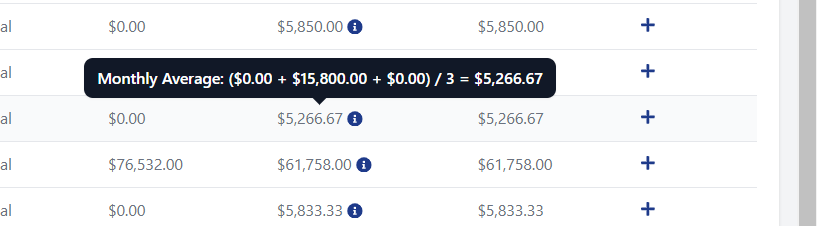
* **\[Charted Automation]** The Accruals Worksheet now displays information on have a estimate is calculated. \[AP-251]
 **Changes:**
* **\[Approval Automation]** Approval requests are now cancelled when a record pending approval is deleted to prevent repetitive "Record Does Not Exist" log entries \[AP-213]
* **\[Accrual Automation]** Accruals for bills pending approval will only apply to transactions dated in previous periods \[AP-251]
**Bug Fixes:**
* **\[Charted Payments]** Fixed a bug that was creating false positives for check failures for outsourced check printing customers \[AP-227]
* **\[Charted SuiteApp]** Resolved "Cannot read property 'invoiceDocId' of null" in certain accounts \[AP-219]
**Changes:**
* **\[Approval Automation]** Approval requests are now cancelled when a record pending approval is deleted to prevent repetitive "Record Does Not Exist" log entries \[AP-213]
* **\[Accrual Automation]** Accruals for bills pending approval will only apply to transactions dated in previous periods \[AP-251]
**Bug Fixes:**
* **\[Charted Payments]** Fixed a bug that was creating false positives for check failures for outsourced check printing customers \[AP-227]
* **\[Charted SuiteApp]** Resolved "Cannot read property 'invoiceDocId' of null" in certain accounts \[AP-219]
Charted 2024.2.8 (2024-09-20)
**New Features:**
* None
**Changes:**
* None
**Bug Fixes:**
* **\[Charted OCR - Bundle]** Unhide Client script to resolve issues with uploading invoices (AP-269)
Charted 2024.2.7 (2024-09-20)
**New Features:**
* None
**Changes:**
* None
**Bug Fixes:**
* **\[SuiteApp- OCR]** Fixed Invoice Processing API Race Condition (IN-291)
Charted 2024.2.6 (2024-09-18)
**New Features:**
* **\[Payment Automation]** Added filters to the Release Payments and Payments History Page (IN-129, IN-130)
* **\[Payment Automation]** Added Reason Column for 'Not Ready for Release' column in Payments Release Table (IN-229)
* **\[Payment Automation]** Customers now receive an error email when uploading an invalid file in the document upload onboarding process (IN-259)
**Changes:**
* **\[Payment Automation]** Check and ACH remittance emails will be sorted by transaction ID in ascending order (IN-125)
* **\[Invoice Scanning - Bills Inbox]** Added ability to filter on a single date field in the bills inbox
**Bug Fixes:**
* **\[Invoice Scanning - Bills Inbox]** Fixed error that was causing subsidiary names to not be properly capitalized in the subsidiary filter (IN-256)
Charted 2024.2.5 (2024-09-06)
**New Features:**
* **\[Expense Accrual Automation]** Charted the calculations of expense accrual estimates based on transactions pending approval, open PO data, and historical transactions.
**Changes:**
* None
**Bug Fixes:**
* None
Charted 2024.2.4 (2024-09-04)
**New Features:**
* **\[OCR - Charted]** Added new filters to the bills inbox including date uploaded range, status, vendor name, and owner \[IN-92]
* **\[Payment Automation]** Added filters to the payee page including type and status \[IN-131]
* **\[OCR - Charted]** Filters will display a number box when an active filter is set \[IN-231]
* **\[Payment Automation]** Bulk import business entity creation for payments \[IN-236]
**Changes:**
* **\[OCR - Charted]** OCR Directions is now called AI Directions on Charted settings \[IN-253]
* **\[OCR - Charted]** Rows per page setting will now be preserved on Charted Tables \[IN-212]
**Bug Fixes:**
* **\[Approval Automation]** Resolved issue causing "Convert to Currency" functionality to not properly convert. \[AP-254]
Charted 2024.2.3 (2024-08-27)
**New Features:**
* None
**Changes:**
* None
**Bug Fixes:**
* **\[Advanced Check Printing]** Resolved issue preventing check printing in 2024.2 because of hidden client script \[IN-238]
Charted 2024.2.2 (2024-08-21)
**New Features:**
* **\[Payment Automation]** Customers can now onboard payees, bank account routing information, and accept TOS directly in the Advanced Vendor Onboarding form \[IN-107 + IN-108]
* **\[OCR - Charted]** Customers can now rotate their pdf in split screen view when reviewing an invoice \[IN-202]
* **\[Payment Automation]** Bank account and routing information is now masked by default when reviewing a payment method or checking a payee \[IN-192 + IN-193 + IN-196]
**Changes:**
* **\[OCR - Charted]** Improved the filter user interface on the bill inbox \[IN-207]
* **\[Payment Automation]** Customers can now link up to 20 funding sources per business entity
* **\[Payment Automation]** Preferred payment method field is hidden on payee details page if payee doesn't have payment methods \[IN-200]
* **\[Platform]** Update hiding preference for client scripts to support NetSuite change \[AP-236]
* **\[Approval Automation]** "Budget Amount" line field label renamed to "Charted Budget Amount” \[AP-233]
**Bug Fixes:**
* None
Charted 2024.2.1 (2024-08-7)
**New Features:**
* **\[Payment Automation]** Customers now receive email notifications when additional documentation is required as part of Business Entity validation \[IN-158 + IN-159]
* **\[Payment Automation]** The bill inbox now includes a filter on subsidiary \[IN-162 + IN-163]
* **\[OCR - Charted]** The bill inbox now displays an add note to bill icon. Bills that have existing notes will show a note icon.
* **\[Payment Automation]** The Payments History table will now display the email of who released the payment. Customers can also export the Payments History as a CSV \[IN-182 + IN-194]
**Changes:**
* **\[All]** All bundles and SuiteApps have updated their version number to 2024.2.1 to reflect compatibility with NetSuite 2024.2
**Bug Fixes:**
* **\[Payment Automation]** Remove 'None' as an option for Preferred Payment Method \[IN-189]
* **\[Payment Automation]** Check events published even if no change is detected, resulting in too many notifications \[IN-203]
* **\[Advanced Vendor Onboarding]** Resolved additional "Unexpected Exception" error when collecting files through form. (AP-215)
---
# Agent Instructions
This documentation is published with GitBook. GitBook is the documentation platform designed so that both humans and AI agents can read, navigate, and reason over technical content effectively. Learn more at gitbook.com.
## Querying This Documentation
If you need additional information that is not directly available in this page, you can query the documentation by asking a question.
Perform an HTTP GET request on the following URL with the `ask` and `goal` query parameters:
```
GET https://docs.charted.com/ap-automation/release-notes/charted-2024.2.md?ask=&goal=
```
`ask` is the immediate question: it should be specific, self-contained, and written in natural language.
`goal` is what the user is ultimately trying to achieve, the reason they need the answer. Sharing it helps GitBook give you a better, more relevant answer. A goal is most helpful when it describes the outcome the user wants rather than restating the question. For example, with `ask=how do I create an API token`, a goal like `automate deployments from our CI pipeline` lets GitBook tailor the answer to that use case.
The response will contain a direct answer to the question and relevant excerpts and sources from the documentation.
Use this mechanism when the answer is not explicitly present in the current page, you need clarification or additional context, or you want to retrieve related documentation sections.