> For the complete documentation index, see [llms.txt](https://docs.charted.com/ap-automation/llms.txt). Markdown versions of documentation pages are available by appending `.md` to page URLs; this page is available as [Markdown](https://docs.charted.com/ap-automation/charted-platform-alerts.md).
# Charted Platform Alerts
Stay on top of the latest Charted platform alerts
{% hint style="info" %}
If you would like to be notified of platform alert notifications, please subscribe to our [mailing list](https://lp.charted.com/sign-up-to-receive-squareworks-software-updates).
{% endhint %}
NetSuite Vendor Sync (2026-04-06)
On April 6, 2026, a scheduled deployment of the Charted SuiteApp introduced a change to the NetSuite Vendor-to-Charted Payee sync process for Payment Automation. The change caused a significantly larger number of Vendors to be identified for sync than intended, resulting in a traffic spike that degraded performance across multiple Charted services. The performance issue was mitigated by 10:00 AM ET. A secondary impact was identified in which the sync triggered existing customer customizations on Vendor records, causing unexpected field changes for some customers.
### Timeline (All Times ET)
| Time | Event |
| -------------------------- | ------------------------------------------------------------------------------------------------------- |
| April 3 6:30 AM | Scheduled deployment of Charted SuiteApp released to all customers. |
| April 3 6:45 AM | Vendor-to-Payee sync begins processing an unexpectedly large volume of records. |
| April 3 7:00 AM | Performance degradation detected across Payment Automation, Accrual Automation, and Invoice AI. |
| April 3 7:15 AM | Engineering team engaged; investigation begins. |
| April 3 8:00 AM | Root cause identified as the updated sync logic matching a broader set of Vendors than intended. |
| April 3 10:00 AM | Performance fully stabilized; all services confirmed operational. |
| April 3 Post-stabilization | Team begins identifying incorrectly synced Vendors and assessing secondary impacts to Vendor records. |
| April 6 9:00 AM | All incorrectly synced Vendors identified and excluded. Customers cleared to resume releasing payments. |
### Root Cause
The deployment included a modification to the criteria used to determine which NetSuite Vendors should be synced to Charted as Payees. The updated logic broadened the match criteria, causing Vendors that were previously excluded from the sync to be picked up and processed.
When the change reached production, the sync process matched and attempted to process a much larger set of Vendors than anticipated. The resulting spike in API calls caused resource contention, leading to degraded performance across Payment Automation, Accrual Automation, and Invoice AI.
#### Secondary Impact: Vendor Record Changes
The Vendor-to-Payee sync is bidirectional. Once a Vendor is synced to Charted, Payee status information is written back to internal custom fields on the NetSuite Vendor record. Charted does not directly modify any other custom or standard fields on the Vendor record.
However, NetSuite executes all customizations associated with a record type whenever that record is saved, regardless of which specific fields were changed. As a result, the Vendor record updates triggered by the sync caused some customers' existing workflows, scripts, or other customizations to execute (similar to what happens if you were to edit + save a Vendor via the UI without changing any fields), producing unintended changes to other fields on affected Vendor records. In most cases, this causes no impact, since all scripts and workflows should typically run when a Vendor is updated. However, there are scenarios where customizations can have unwanted behavior. For example, if a custom workflow existed that re-routed the vendor for approval upon any change to the vendor (even though we just updated our internal sync status fields), this could cause unwanted behavior.
Invoice AI Outage (2025-07-03)
Charted encountered an unexpected outage affecting some users on Invoice AI discovered on July 3 at 8:30 am EDT. The issue prevented PDF invoice documents from properly loading in the inbox split-screen view.
The issue was resolved on July 3 at 10:15 am EDT, and all services were fully restored. At this time, all systems are operating normally.
Charted Sandbox Outage (2025-05-09)
Charted encountered an outage in NetSuite **sandbox accounts only** starting on May 8 at 8:50 pm EDT. The issue was caused by a database migration script blocking sandbox connections to the Automate database.
The issue was resolved on May 9 at 8:53 am EDT, and all services were fully restored. At this time, all systems are operating normally. The issue had no impact on production accounts.
Payments Script Issue (2025-03-27)
Charted experienced a script error impacting payment record viewing and processing in NetSuite**.** This issue was introduced by a new feature deployed the morning of March 27th, 2025, and may have caused errors such as “Cannot read property 'show\_exclude\_from\_automate\_option' of undefined” or “EP\_00015 – Failed to create payment transactions.”
A fix was deployed shortly thereafter, and all services were fully restored. At this time, all systems are operating normally.
Outbound Emails Blocked (2025-03-13)
A change from the NetSuite 2025.1 is affecting outbound emails from Charted , impacting Advanced Vendor Onboarding form delivery. Emails originating from NetSuite accounts without DKIM configured are being blocked, affecting the ability for Charted emails to arrive at external inboxes. Our documentation now references [instructions for configuring DKIM in NetSuite](https://squareworks.us17.list-manage.com/track/click?u=7115a199506cc8411440c46e7\&id=cabfdc437a\&e=1bad0d5eea) in order to ensure outbound emails arrive at the destination inbox.
OCR Performance Degradation (2024-06-24)
Charted experienced performance degradation in OCR invoice scanning. Services were restored at 12:03 pm EDT and the queued backlog of invoices completed processing around 2:40 pm EDT for all customers. At this time, all systems are operating normally with ongoing performance monitoring in place. A small portion of invoices may have failed to scan during this time which will not be included in billable usage and can be resolved by either re-uploading for OCR scanning or manual entry.
Formula Fields in Saved Searches (2023-08-11)
**Overview:**
Starting in NetSuite 2023.2, saved searches with embedded HTML will no longer work as expected if the saved search result field is set to Formula (Text).
**Impact**:
Starting in NetSuite 2023.2, the OCR Vendor Invoice Queue is impacted, as it uses "Formula (Text)" fields to embed HTML. This has been corrected in version 2023.2.1 of our **OCR and Invoice Scanning** feature**.**
When viewing the invoice queue in NetSuite 2023.2 (Lists > Advanced Bill Management > Invoice Queue), if you see results that look similar to this, you are impacted:\
\

**Resolution**:
1. Have a NetSuite Administrator update the **OCR and Invoice Scanning** feature (Bundle ID 3400110) to version 2023.2.1. If you're currently on the latest version, skip to step 2.
2. Manually update non-packaged invoice queues. **Most** customers use the packaged version of the invoice queue, and no further action is needed. To identify if action is needed, go to **Lists > Advanced Bill Management > Invoice Queue** to identify if you depend on a custom version of the queue. If the title shows "Vendor Invoice Queue: Results", you depend on the packaged version and no further action is needed.\
\ 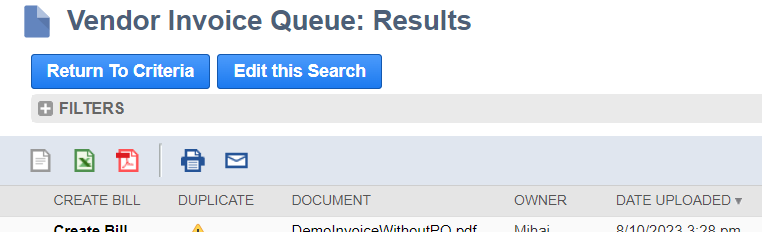 3. If the queue name is different, you are using a custom version of our invoice queue search, which was customized as part of your implementation. In this scenario, updating to version 2023.2.1 will not resolve the issue. Instead, have an administrator press **Edit this Search,** go to the Results tab, and change all "Formula (Text)" fields to "Formula (HTML)". Save the search once changing all "Formula (Text)" fields.\
\

3. If the queue name is different, you are using a custom version of our invoice queue search, which was customized as part of your implementation. In this scenario, updating to version 2023.2.1 will not resolve the issue. Instead, have an administrator press **Edit this Search,** go to the Results tab, and change all "Formula (Text)" fields to "Formula (HTML)". Save the search once changing all "Formula (Text)" fields.\
\

NetSuite Email Capture Plugin Incident (2023-08-11)
On 8/11, some of our clients reported issues with sending emails to NetSuite for uploading vendor invoices, as well as approving records through email. After investigating the matter, we confirmed that this was due to a widespread [NetSuite incident](https://status.netsuite.com/incidents/df2ynpx4ngdd) affecting Email Capture Plugins, which Charted uses to process Email approvals and invoice processing. It's important to note that this NetSuite incident is not limited to Automate, but to all NetSuite accounts using NetSuite's Email Capture Plugin technology.\
\
We are pleased to report that **NetSuite has resolved the issue**. However, we strongly advise you to take the following actions to stay ahead of this NetSuite change and minimize risk:
1. Email addresses may have changed during the process of resolving this issue, and clients should validate and correct any email addresses using the process found on our online documentation page [here](https://docs.squareworks.com/automate/automate-platform-alerts#email-capture-plugin-email-address-change-2023-04-07). Even if you have previously completed this step, we strongly recommend that you validate these addresses again.
2. Invoice upload and approval emails that were sent during the downtime may not have been processed.
* **For Email Invoice Upload**: Re-send any invoices to your new Email Upload address.
* **For Approvals:** Click the Approve or Reject button in any approval request email that was not captured to generate a new response.
Email Capture Plugin Email Address Change (2023-04-07)
**Overview:**
On 3/31, one of our clients reported issues with sending emails to NetSuite for uploading vendor invoices. After investigating the matter with NetSuite, it was discovered that NetSuite had unexpectedly changed all inbound email addresses (found at Customization > Plug-ins > Manage Plug-ins > Email Capture Plugins) to enhance security. This change impacts all NetSuite customers and accounts, not just Charted customers, and occurred between 3/29 and 3/30.
Initially, NetSuite stated that the old email addresses used for sending invoices and approval responses would continue to work as expected, with no planned retirement date. However, within the past 24 hours of this alert, another client reported an issue with the old email addresses not accepting emails. This may be unrelated, but after raising the issue with NetSuite again, their recommendation is to proactively switch to the new email addresses to reduce risk.
**Impact**:
There are two Email Capture Plugin email addresses that are impacted within our solution. You can find the new email addresses by going to Customization > Plug-ins > Manage Plug-ins. Below is an example of the screen showing the Email Capture Plugin email addresses:
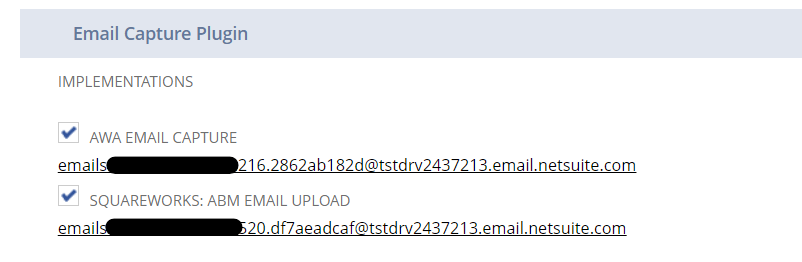 "AWA Email Capture" is used to receive approval/reject responses via email. "Charted: ABM Email Upload" is used to receive inbound vendor invoices to be scanned via OCR.
This change impacts all customers who email invoices to be scanned or approve via email. As of this notification, only two customers have reported at potential problem using the old email addresses. In those cases, vendor invoices send to their old email address failed to appear in their invoice queue.
**Resolution**:
NetSuite has recommended that all customers update their process to use the new email addresses.
1. If you currently email invoices to NetSuite to be scanned via OCR, you should update your internal processes / email server to forward invoices to the new "Charted: ABM Email Upload" email address found on the Manage Plug-ins page.
2. If you currently have employees approve records via email, you should update your approval settings to use the new "AWA Email Capture" email address found on the Manage Plug-ins page. Copy the new email address and then navigate to Setup > Approval Workflow Automation > Approval Settings. Edit the page, and enter the copied email address into the Email Capture Address field, replacing the existing email address, and save the settings:\
\

"AWA Email Capture" is used to receive approval/reject responses via email. "Charted: ABM Email Upload" is used to receive inbound vendor invoices to be scanned via OCR.
This change impacts all customers who email invoices to be scanned or approve via email. As of this notification, only two customers have reported at potential problem using the old email addresses. In those cases, vendor invoices send to their old email address failed to appear in their invoice queue.
**Resolution**:
NetSuite has recommended that all customers update their process to use the new email addresses.
1. If you currently email invoices to NetSuite to be scanned via OCR, you should update your internal processes / email server to forward invoices to the new "Charted: ABM Email Upload" email address found on the Manage Plug-ins page.
2. If you currently have employees approve records via email, you should update your approval settings to use the new "AWA Email Capture" email address found on the Manage Plug-ins page. Copy the new email address and then navigate to Setup > Approval Workflow Automation > Approval Settings. Edit the page, and enter the copied email address into the Email Capture Address field, replacing the existing email address, and save the settings:\
\

---
# Agent Instructions
This documentation is published with GitBook. GitBook is the documentation platform designed so that both humans and AI agents can read, navigate, and reason over technical content effectively. Learn more at gitbook.com.
## Querying This Documentation
If you need additional information that is not directly available in this page, you can query the documentation dynamically by asking a question.
Perform an HTTP GET request on the current page URL with the `ask` query parameter, and the optional `goal` query parameter:
```
GET https://docs.charted.com/ap-automation/charted-platform-alerts.md?ask=&goal=
```
`ask` is the immediate question: it should be specific, self-contained, and written in natural language.
`goal` is optional and describes the broader end goal you are ultimately trying to accomplish on behalf of the user. GitBook uses it to tailor the answer towards what is most useful for that goal.
The response will contain a direct answer to the question and relevant excerpts and sources from the documentation.
Use this mechanism when the answer is not explicitly present in the current page, you need clarification or additional context, or you want to retrieve related documentation sections.