> For the complete documentation index, see [llms.txt](https://docs.charted.com/ap-automation/llms.txt). Markdown versions of documentation pages are available by appending `.md` to page URLs; this page is available as [Markdown](https://docs.charted.com/ap-automation/charted-configuration/on-premise-check-printing/micr-specifications-and-alignment-offsets-using-a-micr-gauge.md).
# MICR Specifications and Alignment Offsets (Using a MICR Gauge)
### **Abstract**
*MICR* specifications and alignment offsets are essential to configuring check printing in *Charted* using the *Standard PDF* template. These settings ensure that check numbers, account numbers, and *MICR* line symbols within exactly where banks expect them to be. Proper alignment prevents rejected checks, supports regulatory compliance, and improves the likelihood of successful validation at the bank.
For example, administrators must follow bank-supplied *MICR* specs and validate alignment using a *MICR* gauge before going live when setting up a new check layout for a different bank.
This article explains how to enter *MICR* specification values, enable file copy options, determine alignment through a check layout page, and validate the *MICR* line with a physical *MICR* gauge.
### **Entering MICR Specifications**
The customer will provide *MICR* specifications — usually from their bank — which include key values that dictate how the *MICR* number appears at the bottom of printed checks.
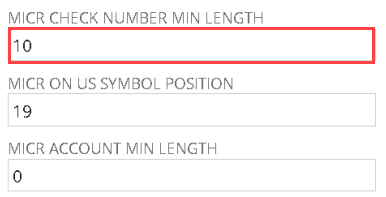
1. Begin by using the MICR specification document under the **Check Template Parameters** section. It will include the **MICR CHECK NUMBER MIN LENGTH, MICR ON US SYMBOL POSITION**, and **MICR ACCOUNT MIN LENGTH**:\
2. Next, enter the **MICR CHECK NUMBER MIN LENGTH**, which defines the minimum number of digits for the check number. This value ensures the number is zero-filled to meet formatting requirements. (Standard PDF template only, v1.5.0+):\
3. In the field below, designate the position of the On Us symbol in the **MICR ON US SYMBOL POSITION** field. This setting varies by bank and should match the MICR specification exactly. (Standard PDF template only, v1.5.0+):\
\
\
**Note:** This field is usually the most variable and should match the bank-provided specification exactly.\
4. Then, enter the minimum number of digits in the **MICR ACCOUNT MIN LENGTH** to zero-fill the account number. (Standard PDF template only, v1.5.0+):\
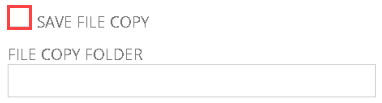
5. To store watermarked copies of printed checks in the **File Cabinet**, check the **SAVE FILE COPY** box to automatically store each printed check and stub. The copies will automatically add a watermark to the PDF(s) to void the check. (Standard Template Only, v1.5.6+):\
6. Then, in the **FILE COPY FOLDER** field, enter the internal ID of the target **File Cabinet** folder where the copies should be saved. (Standard Template Only, v1.5.6+):\
\
\
Note: This will only be used if the **Save File Copy** checkbox is checked.\
7. On occasion, you might need to pull specific information from a vendor bill to appear on the printed check. Use the **VENDOR BILL LINE SEARCH** dropdown to extract line-level detail from the vendor bill and include it in the check layout:\
### **Setting Alignment and Layout Fields**
To control how the check and address fields align on the printed stock, configure the **Check Alignment** fields using a printed alignment page.
1. To confirm how the check aligns on physical stock, use the **Check Alignment** section:\
2. To set the **CHECK POSITION,** click the dropdown and select from **Top, Middle,** or **Bottom** — based on where the print lands:\
3. Then, from that alignment page, you'll get the **TOP PERFORATION (MM)** and **BOTTOM PERFORATION (MM)** values:\
4. If they use **ENVELOPE ADDRESS WINDOW TOP (MM)** and **ENVELOPE ADDRESS WINDOW LEFT (MM)**, they can fold that same alignment page and stick it in an envelope, and then we can see the numbers there:\
\
\
**Note:** Some customers may use different check stocks for different banks, which affects layout and print position.\
5. To fix vertical misalignment, adjust **PAGE OFFSET (VERTICAL), TOP STUB OFFSET (VERTICAL), BOTTOM STUB OFFSET (VERTICAL),** or **CHECK OFFSET (VERTICAL)** as needed:\
6. Likewise, for horizontal adjustments, modify **PAGE OFFSET (HORIZONTAL), TOP STUB OFFSET (HORIZONTAL), BOTTOM STUB OFFSET (HORIZONTAL),** or **CHECK OFFSET (HORIZONTAL)**:\
7. In most cases, the fields most likely to be adjusted are **MICR LINE OFFSET (VERTICAL) AND MICR LINE OFFSET (HORIZONTAL)**, especially if the **MICR** line does not land properly:\
\
\
Note: If all other settings appear correct, but the **MICR** line is still misaligned, there may be an issue with the printer itself. In these cases, adjusting the **MICR Line Offset** fields is typically the most effective solution. Use a **MICR** gauge — a clear ruler placed over the printed check — to determine whether the **MICR** line lands within the appropriate measurement boxes.\
### **Duplicating an Existing Format for a New Bank**
Rather than creating a check format from scratch, administrators can duplicate a similar existing one.
1. Begin by opening a **CPB Check Format List** to use the same bank or one with a similar layout. To do that, click the **List** button at the top of the page:\
2. Once it loads, it will open a new screen for the **CPB Check Formal List**:\
3. To get a support ticket where somebody wants you to add a new bank, click the **Edit** button on one of the existing one:\
\
It will open the screen for the **CPB Check Format**:\
4. Click the **Save & Copy** button to generate a duplicate:\
\
\
Note: Edit the copy as needed and always test it in a sandbox if it is a new bank, not one they've set up before.\
5. Once testing is complete, click the **Save** button to save **CPB Check Format**:\
This concludes the process for configuring **MICR** specifications and checking format alignment using a **MICR** gauge.
---
# Agent Instructions
This documentation is published with GitBook. GitBook is the documentation platform designed so that both humans and AI agents can read, navigate, and reason over technical content effectively. Learn more at gitbook.com.
## Querying This Documentation
If you need additional information that is not directly available in this page, you can query the documentation dynamically by asking a question.
Perform an HTTP GET request on the current page URL with the `ask` query parameter, and the optional `goal` query parameter:
```
GET https://docs.charted.com/ap-automation/charted-configuration/on-premise-check-printing/micr-specifications-and-alignment-offsets-using-a-micr-gauge.md?ask=&goal=
```
`ask` is the immediate question: it should be specific, self-contained, and written in natural language.
`goal` is optional and describes the broader end goal you are ultimately trying to accomplish on behalf of the user. GitBook uses it to tailor the answer towards what is most useful for that goal.
The response will contain a direct answer to the question and relevant excerpts and sources from the documentation.
Use this mechanism when the answer is not explicitly present in the current page, you need clarification or additional context, or you want to retrieve related documentation sections.