> For the complete documentation index, see [llms.txt](https://docs.charted.com/ap-automation/llms.txt). Markdown versions of documentation pages are available by appending `.md` to page URLs; this page is available as [Markdown](https://docs.charted.com/ap-automation/charted-configuration/approval-automation/advanced-options-payment-holds-and-auto-submit.md).
# Advanced Options, Payment Holds & Auto-Submit
### **Abstract**
*NetSuite’s Approval Workflow Automation (AWA)* includes a set of advanced configuration options designed to support approval processes for custom record types and scenarios where standard *Approval Routing* is not available. These settings, located on the *Advanced* tab, enable administrators to control approval behavior through predefined field IDs, automate submission workflows, prevent payments on unapproved records, and override the default routing logic.
This article explains how to configure the *Advanced* tab within the *AWA Approval Record Type Settings*.
### **Configuring Advanced Settings for Approval Workflow Automation**
The **Advanced** tab contains settings that offer deep customization of the approval workflow. These fields are primarily used for edge cases and should only be configured when you have a specific need to override default approval logic. Most of the fields listed require the use of predefined custom fields.\
\
Follow these steps to configure the **Advanced** settings:
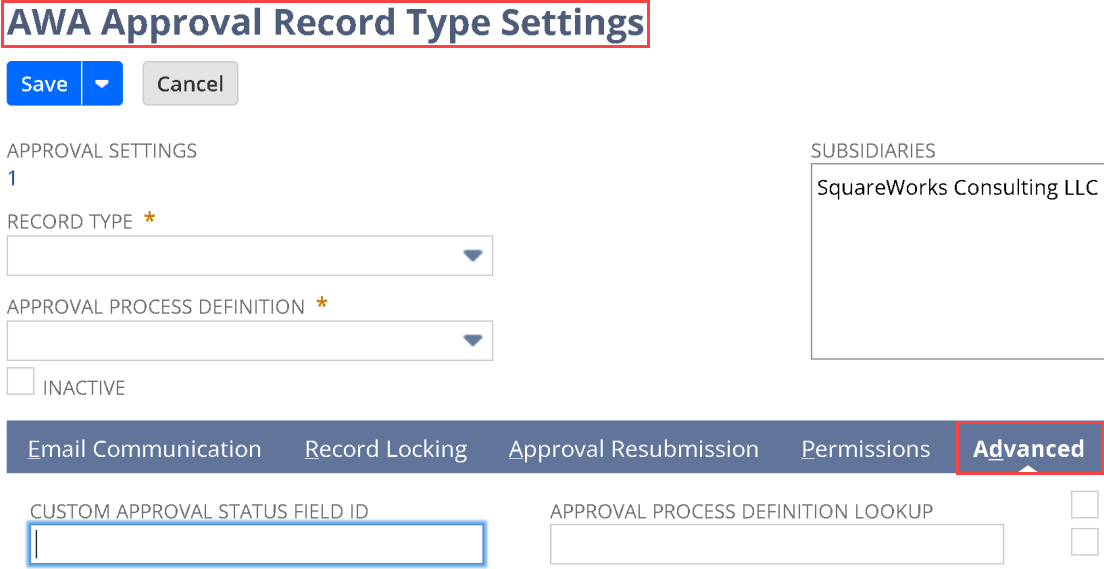
1. To access the advanced configuration options, locate and select the **Advanced** tab within the **AWA Approval Record Type Settings** page:\
2. Set the **CUSTOM APPROVAL STATUS FIELD ID** to the ID of a custom field (type: **List/Record – AEA Approval Status**) that will store the approval status on the record:\
3. To initiate actions from scripts or workflows, set the **APPROVAL ACTION FIELD ID** to a free-form text field:\
\
\
**Note:** If the field contains one of these values — **{"action":"SUBMIT"}**, **{"action":"APPROVE"}**, **{"action":"CANCEL"}**, **{"action":"REJECT"}**, or **{"action":"RESUBMIT"}** — Approval Workflow Automation will process it asynchronously, clear the field, and may add a short delay.\
4. Enable the **HIDE SUBMIT BUTTON** box if you want to remove the **Submit** button from the record:\
5. Then, set the **CUSTOM TOTAL FIELD ID** if your approval steps need to reference a custom field for the transaction total instead of *NetSuite’s* default “**total**” field:\
\
\
**Note:** This is only needed for specific use cases and is not required for most records.\
6. To store the active approval request, specify the **CURRENT APPROVAL REQUEST FIELD ID** using a custom field (type: **List/Record – AWA Approval Process Request**). For standard transactions, this is handled automatically by the hidden field **custbody\_sw\_awa\_current\_approval\_req**:\
7. Enter the **APPROVAL PROCESS DEFINITION LOOKUP** using a custom field (type: **List/Record – AWA Approval Process Definition**):\
\
\
**Note:** This setting overrides the default approval process and is mainly used when workflows or scripts need to apply a different process.\
8. To hide step numbers on the **Approval History** tab, enable **HIDE STEP ORDER.** Once enabled, only the step names will be shown:\
9. Next, check the **ENABLE CHECK PRINTING APPROVAL** field to require approval before printing checks. A **Charted Check Printing** license is required:\
10. To prevent records from being used before approval, enable the **INACTIVATE UNAPPROVED RECORDS** field:\
11. Then, to prevent vendor bills from being paid before approval, enable **HOLD PAYMENT FOR UNAPPROVED BILLS.** The bills will remain on payment hold until fully approved:\
12. To automatically submit all newly created records into the approval workflow, check the option **SUBMIT FOR APPROVAL ON CREATION (ALL)**:\
\
\
**Note:** This setting ensures that records are routed into approval without requiring user action.\
13. Enable **SUBMIT FOR APPROVAL ON CREATION (NON-UI ONLY)** to auto-submit records that aren’t created through the UI:\
This concludes the process of configuring **Advanced** options for vendor bills in **Approval Workflow Automation**.
---
# Agent Instructions
This documentation is published with GitBook. GitBook is the documentation platform designed so that both humans and AI agents can read, navigate, and reason over technical content effectively. Learn more at gitbook.com.
## Querying This Documentation
If you need additional information that is not directly available in this page, you can query the documentation by asking a question.
Perform an HTTP GET request on the following URL with the `ask` and `goal` query parameters:
```
GET https://docs.charted.com/ap-automation/charted-configuration/approval-automation/advanced-options-payment-holds-and-auto-submit.md?ask=&goal=
```
`ask` is the immediate question: it should be specific, self-contained, and written in natural language.
`goal` is what the user is ultimately trying to achieve, the reason they need the answer. Sharing it helps GitBook give you a better, more relevant answer. A goal is most helpful when it describes the outcome the user wants rather than restating the question. For example, with `ask=how do I create an API token`, a goal like `automate deployments from our CI pipeline` lets GitBook tailor the answer to that use case.
The response will contain a direct answer to the question and relevant excerpts and sources from the documentation.
Use this mechanism when the answer is not explicitly present in the current page, you need clarification or additional context, or you want to retrieve related documentation sections.